
An AI chatbot a website can trust
Connecting a language model takes an afternoon. The work is deciding what the bot may say, where its knowledge comes from and what happens when it does not know.
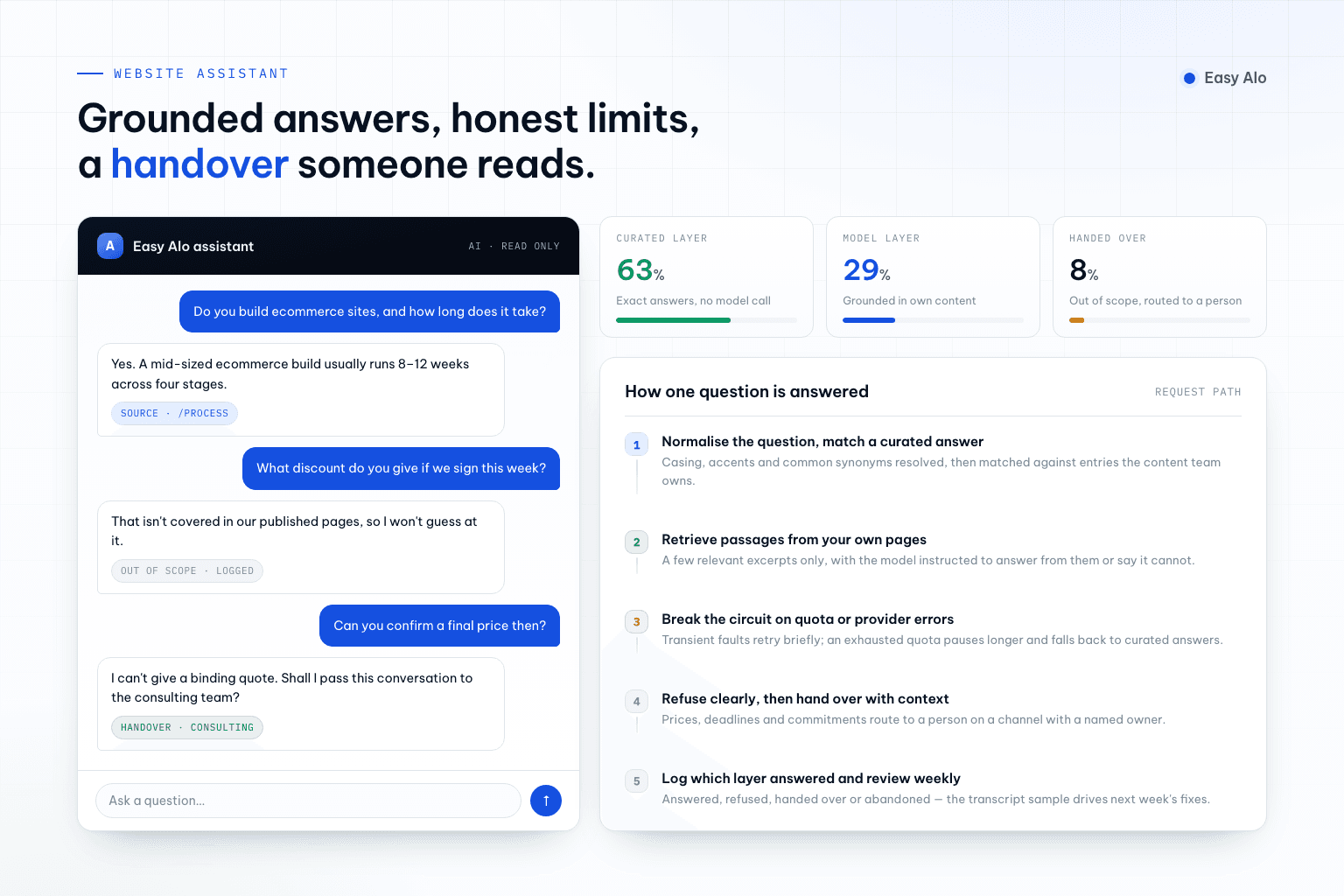
A chatbot is now one of the easiest features to demonstrate and one of the easiest to get wrong. A model, an API key and a floating button produce something impressive in a demo and unreliable in production, because the demo never asks what happens when the answer is invented, the quota runs out or the visitor asks about a price that changed last week.
The version worth shipping is narrower than most briefs assume. It answers a defined set of questions from content the business controls, says so when it cannot help, and hands the conversation to a person on a path someone actually monitors.
1. Decide the job before choosing the model
“A chatbot for the website” is not a scope. Look at the questions the team already answers by email, chat and phone, and group them. Most sites find that a small number of intents cover the majority of traffic: what the company does, whether a service fits a situation, price ranges and timelines, project process, careers, and how to reach a human.
That list decides everything downstream — the knowledge the bot needs, the answers that must be exact, and the boundary where it should stop. It also sets an honest expectation: a website assistant that handles seven out of ten routine questions well is a success. One that attempts everything will be wrong in public.
- Collect a hundred real questions from existing channels before writing any prompt.
- Group them into intents, and mark which ones have a single correct answer.
- Decide what the bot must never do: quote a binding price, promise a deadline, take a payment, change a record.
- Define the success measure: resolved without a human, or handed over with enough context.
- Name who owns the answers, because content ownership is what keeps the bot correct.
The strongest constraint is usually the most useful one. A bot restricted to what the company has published is far easier to trust than one allowed to improvise.
2. Answer known questions deterministically, use the model for the rest
Questions with one correct answer should not be generated. Opening hours, service scope, contact details and process steps belong in a curated set of entries that the team edits directly. Matching a question to a known entry first gives the same answer every time, costs nothing per request and can be corrected in minutes without touching code.
The model earns its place on the rest: questions phrased in unexpected ways, questions that combine two topics, and questions that need a summary rather than a fact. Treating it as the second layer rather than the front door reduces cost, reduces variance and makes the failure modes far easier to reason about.
- Curate entries for every question with an exact answer, and let the content team own them.
- Normalise the question — casing, accents, punctuation, common synonyms — before matching.
- Set a confidence threshold for direct matching, and pass everything below it to the model.
- Cache generated answers for repeated questions, keyed on the normalised text.
- Log which layer answered, so the split between curated and generated is visible over time.
3. Ground answers in content the business controls
A model with no source material will produce fluent text about a company it does not know. Grounding means the answer is assembled from retrieved passages of your own content — service pages, process descriptions, published case studies, the curated entries — and the prompt instructs the model to answer only from what it was given.
This makes content quality the real determinant of chatbot quality. If two pages state different lead times, the bot will confidently pick one. Preparing the knowledge base is usually the largest and least glamorous part of the project, and skipping it is the most common reason a pilot never reaches production.
- Retrieve a small number of relevant passages per question rather than sending everything.
- Instruct the model to answer only from the supplied context and to say when it is not covered.
- Reconcile contradictions in the source content before launch; the bot will surface every one.
- Show the source page alongside the answer so a visitor can verify and continue reading.
- Re-index when content changes, and treat a stale index as a production defect.
Grounding reduces invention but does not eliminate it. Any answer involving a number, a commitment or a legal statement still needs a human-approved wording.
4. Design the failure paths before the happy path
Three failures are certain: the provider will be unavailable, the quota or budget will be exhausted, and a visitor will ask something outside scope. Each needs a designed response, because the default behaviour — a spinner, a stack trace or a confident guess — is worse than a plain admission.
The pattern that holds up is a fallback chain with a circuit breaker. When the provider fails or returns a quota error, stop calling it, serve curated answers, and offer a handover. Distinguish a temporary error, which deserves a short retry, from an exhausted quota, which deserves a longer pause and a check before resuming. Then say something honest to the visitor in the meantime.
- Separate transient provider errors from quota exhaustion, and back off differently for each.
- Open a circuit breaker after repeated failures, shared across instances rather than per process.
- Always keep a curated-answer mode that works with the model completely unavailable.
- Offer handover with the conversation attached, to a channel someone is responsible for.
- Rate limit per visitor, and cap conversation length and response size to bound cost.
- Tell the visitor plainly when the assistant is limited, instead of failing silently.
5. Treat input as untrusted, then improve from real conversations
Everything a visitor types is untrusted input, and so is any content the model retrieves. Instructions hidden in a message or a document can attempt to override the system prompt, extract configuration or push the bot outside its role. Keep the API key server-side, give the bot no write access, and validate anything it produces that a system will act on.
After launch, the improvement loop matters more than the model choice. Read real transcripts weekly, group the failures, and fix them where they belong: a missing curated entry, a contradictory page, a prompt that permits too much, a handover that nobody answered. Most of what makes a chatbot good is content and boundary work, applied repeatedly.
- Keep provider credentials on the server; the browser never calls the model directly.
- Give the assistant read-only access, and no ability to change records or take payments.
- Assume retrieved content may contain injected instructions, and constrain the prompt accordingly.
- Store transcripts with a retention limit, redact personal data, and disclose the practice.
- Review a weekly sample: answered correctly, answered wrongly, refused, handed over, abandoned.
- Test with a fixed set of questions before each change, so a prompt edit cannot silently regress.
Tell visitors they are talking to an assistant and how to reach a person. Disclosure costs one sentence and prevents the kind of misunderstanding that no amount of model quality can repair.
Checklist before putting a chatbot on a live site
- A defined list of intents in scope, and an explicit list of things the bot must never do.
- Curated answers for every question with a single correct response, owned by the content team.
- Answers grounded in your own content, with the source shown to the visitor.
- Contradictions in the source content reconciled before launch.
- A fallback mode that still answers when the model provider is unavailable.
- Distinct handling for transient errors and exhausted quota, with a circuit breaker.
- Handover to a human channel with a named owner who monitors it.
- Rate limits, response caps and a cost ceiling per day.
- Provider credentials server-side only, with the assistant granted no write access.
- A weekly transcript review and a fixed question set run before every change.